
Fitbit Google Air Review: A Minimalist, Screenless Activity Tracker for 24/7 Health Monitoring
Introduction
The Fitbit Google Air is Google’s answer for people who want serious health and fitness insights without a glowing screen on their wrist. Positioned as a lightweight, screenless activity tracker, it focuses on continuous monitoring of daily movement, heart rate, and sleep, while pushing all interaction and insights into the Google Health app on your phone.
In this review, we’ll explore how the Fitbit Google Air in Obsidian performs in everyday use, what it does well, where it falls short, and who is most likely to appreciate this minimalist approach to wearable tech.
Product Overview and Key Features
The Fitbit Google Air - Screenless Activity Tracker - Obsidian | Fitness, heart rate, & sleep tracking, personalized AI-powered coaching, up to 7 days’ battery life, works with iOS & Android is built around a few clear design pillars: comfort, subtlety, and data-rich app experiences rather than on-wrist screens.
Design and Build
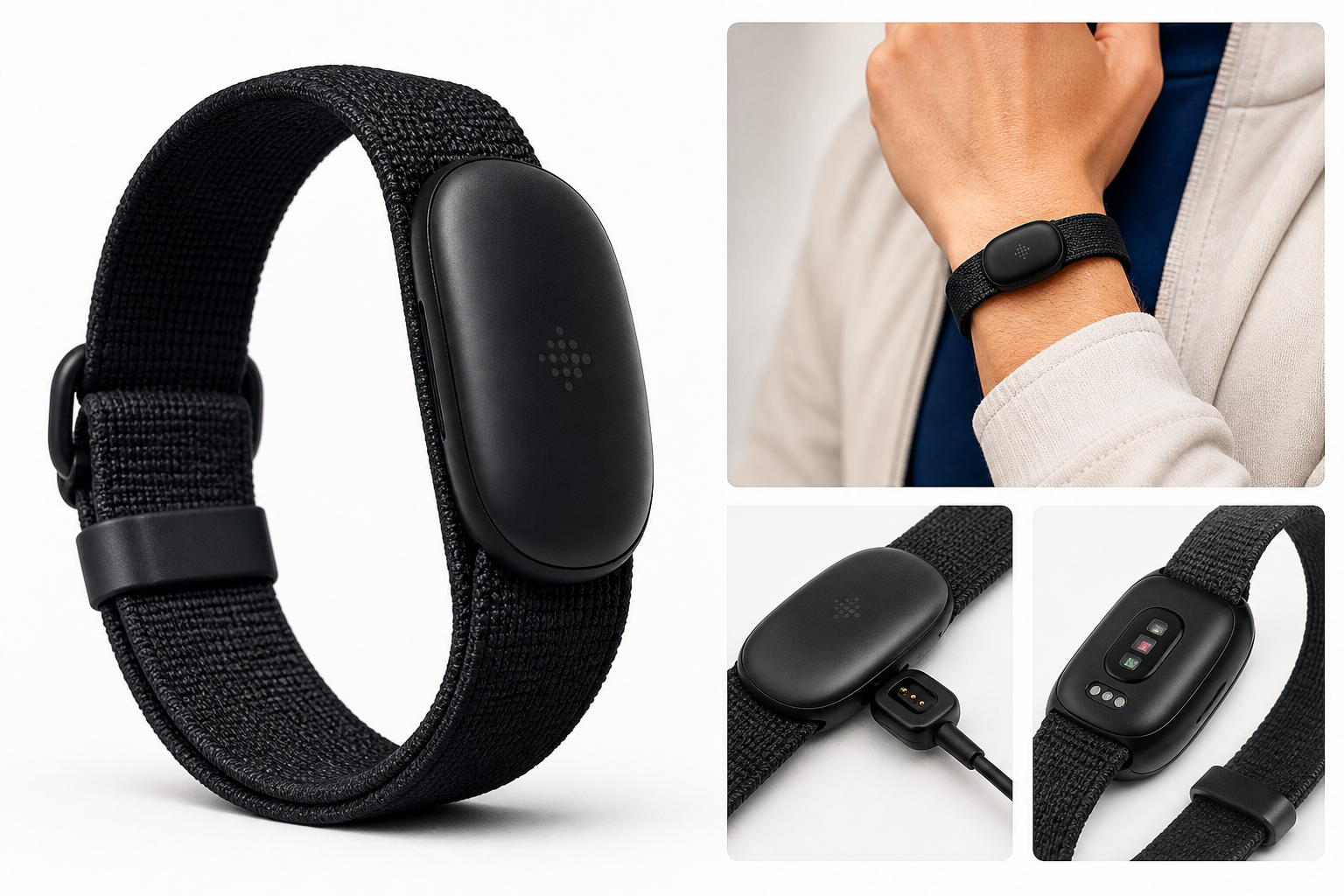
- Screenless “pebble” form factor: The tracker is a compact module that presses into a soft band, creating a low-profile look that resembles a simple bracelet rather than a smartwatch. This makes it suitable for the office, the gym, and sleep without drawing much attention.
- Obsidian band: The Obsidian colorway offers a clean, understated aesthetic that pairs easily with both casual and professional outfits.
- 24/7 wearability: The lightweight design and micro-adjustable band system are intended for around-the-clock wear, including during workouts and overnight.
Health and Fitness Tracking
The Fitbit Google Air focuses on the core metrics most users care about:
- Daily activity tracking: Steps, active minutes, and overall movement trends.
- Heart rate monitoring: Continuous heart rate tracking for resting heart rate trends and workout intensity.
- Sleep tracking: Overnight monitoring aimed at capturing total sleep time and sleep stages, giving a picture of overall sleep quality.
- Exercise tracking: Automatic detection of common activities and the ability to log or refine workouts via the Google Health app.
Smart Features and Connectivity
- Google Health app integration: All metrics, trends, and AI-powered insights live inside the Google Health app, which is available for both iOS and Android.
- Personalized AI-powered coaching: Using your activity, heart rate, and sleep data, the system can surface suggestions and nudges that adapt over time.
- Works with iOS and Android: Compatibility with both major mobile platforms broadens the potential audience.
Battery and Charging
- Up to 7 days of battery life: The screenless design helps the Fitbit Google Air achieve up to a week of use on a single charge under typical conditions.
- Fast charging: A short charge session can provide enough battery for extended use, reducing downtime.
Performance and User Experience
Setup and App Experience
Pairing the Fitbit Google Air with a phone requires installing and using the Google Health app. Setup is relatively straightforward: you follow the on-screen instructions to connect via Bluetooth, grant the required permissions, and then let the tracker begin collecting data.
The Google Health app is central to the experience. It presents:
- Daily dashboards for activity, heart rate, and sleep.
- Weekly and monthly trend views so you can see changes in your habits over time.
- Coaching and insights that attempt to interpret your data and suggest next steps.
Some users will appreciate having everything consolidated in one place, while others may need time to adjust if they are used to the older Fitbit app.
Activity and Heart Rate Tracking
For day-to-day movement, the Fitbit Google Air performs similarly to other wrist-based trackers:
- Step counting: Everyday walking, commuting, and light exercise are captured reliably enough for general health tracking.
- Heart rate: Continuous monitoring provides resting heart rate trends and a decent approximation of intensity for most workouts.
Because there is no on-device display, you don’t see live stats on your wrist. Instead, you:
- Start, review, or adjust activities in the Google Health app.
- Check your results and trends after a workout rather than during it.
This workflow suits users who don’t want to be checking metrics mid-run or mid-class, but it may frustrate athletes who rely on real-time pace, heart rate zones, or distance metrics.
Sleep Tracking
The Fitbit Google Air is designed for comfortable overnight wear, which is crucial for accurate sleep data. In practice, many users report that:
- Nightly sleep duration and general sleep patterns are captured with reasonable accuracy.
- Longer naps often register correctly, though very short naps may sometimes be missed.
The Google Health app then breaks sleep into stages and provides insights about sleep consistency and recovery. For users who prioritize better sleep hygiene, this can be one of the most valuable aspects of the device.
AI-Powered Coaching
The personalized AI-powered coaching is one of the headline features. Rather than just listing numbers, the system:
- Surfaces tailored recommendations based on your recent activity, heart rate trends, and sleep.
- May suggest adjustments like increasing daily movement, modifying bedtimes, or varying workout intensity.
The usefulness of these suggestions can vary. Some people will find the guidance helpful and motivating, while more experienced athletes or data-savvy users may view it as basic or occasionally irrelevant. It is best seen as assistive rather than a fully-fledged training plan.
Comfort and Everyday Wear
Comfort is a strong point for the Fitbit Google Air:
- The band and pebble are light enough that you can wear them for long stretches without fatigue.
- The low-profile shape makes it easy to wear the tracker under sleeves or alongside a traditional watch.
- The absence of a screen means no buzzing notifications or bright lights disturbing sleep or meetings, which is a major selling point for people who are trying to reduce screen time.
Some users with very sensitive skin may need to experiment with fit and band material, as with any wearable that’s in constant contact with the skin.
Battery Life and Charging
In typical mixed use, many owners see battery life approaching the claimed up to 7 days. Heavy exercise tracking or frequent syncing can reduce that somewhat, but the overall experience still feels closer to a weekly charge cycle than a daily one.
Fast charging is also practical. If you forget to charge overnight, a short charge session can quickly restore enough battery for another day’s use, easing battery anxiety.
Pros and Cons
Pros
- Screenless design reduces distractions and makes the tracker feel more like a simple bracelet than a gadget.
- Lightweight and comfortable for genuine 24/7 wear, including sleep.
- Strong focus on core metrics: activity, heart rate, and sleep tracking are all handled well for general users.
- Good battery life, with up to a week between charges in typical conditions.
- Works with both iOS and Android, expanding compatibility compared with some platform‑locked devices.
- AI-powered coaching in the Google Health app provides accessible guidance based on your data.
- Minimalist style that blends into a variety of outfits and situations.
Cons
- No on-device display means no live workout stats, no quick check of steps or heart rate on the wrist.
- Heavier reliance on the Google Health app than traditional Fitbits; everything from starting workouts to viewing data happens on the phone.
- No built-in GPS, so outdoor distance tracking relies on your phone and may require corrections after the fact.
- Coaching insights can feel generic for advanced or highly engaged fitness users.
- Not ideal for users who want smartwatch features, such as notifications, payments, or third-party apps.
Conclusion and Recommendation
The Fitbit Google Air in Obsidian is a thoughtfully designed tracker for a specific kind of user: someone who wants meaningful health and fitness data, but doesn’t want yet another screen competing for their attention.
It excels at being:
- Discrete and comfortable enough for round-the-clock wear.
- Capable of tracking daily activity, heart rate, and sleep to a level that satisfies most non‑athlete users.
- Low maintenance, thanks to its battery life and screenless form factor.
On the other hand, it is not the right choice if you:
- Want live metrics on your wrist during runs, rides, or gym sessions.
- Need smartwatch capabilities like notifications, apps, or media controls.
- Depend on built-in GPS and advanced training tools.
If your priority is a quiet, unobtrusive device that gathers data in the background and lets you review it later in an app, the Fitbit Google Air is a compelling option. Its mix of screenless design, week-long battery life, and AI‑assisted insights makes it particularly appealing to users trying to cut down on digital distractions while still staying on top of their health.