
Samsung 34-Inch ViewFinity S5 S55GH Ultrawide Monitor Review
Quick Summary
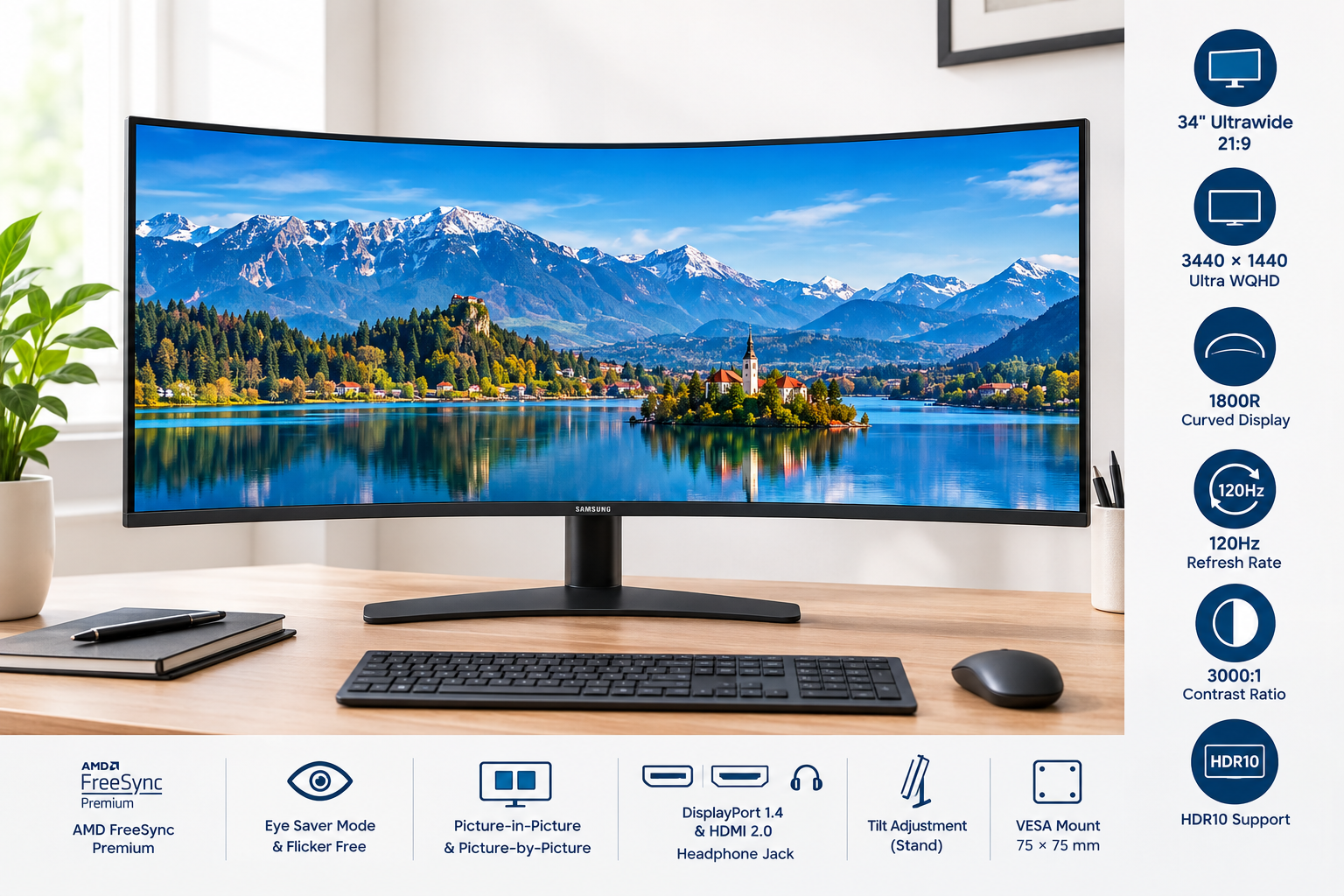
The Samsung 34-inch ViewFinity S5 S55GH Ultrawide Monitor is a large curved display built around a 21:9 aspect ratio and 3440 x 1440 Ultra WQHD resolution. It combines a VA panel with a 120Hz refresh rate, 5ms response time, HDR10 support, and AMD FreeSync Premium.
Its wide canvas is particularly useful for multitasking, timeline-based creative work, spreadsheets, document comparison, and immersive video playback. The monitor also includes eye-comfort features such as Eye Saver Mode and flicker reduction. However, its stand offers limited adjustment, and the connectivity selection is focused on essential display inputs rather than a full docking-station experience.
Detailed Analysis
Display and Image Quality
The 34-inch panel provides a 3440 x 1440 resolution, giving users substantially more horizontal workspace than a conventional 16:9 QHD monitor. The 21:9 layout is well suited to placing multiple application windows side by side without relying as heavily on window switching.
Samsung uses a VA panel with a stated 3,000:1 contrast ratio. This generally supports deeper blacks and stronger contrast than many standard IPS office monitors, which can benefit movies, games, and dark design interfaces. The panel is rated for 300 cd/m² brightness and supports HDR10, although its brightness level is more appropriate for everyday HDR compatibility than for high-impact HDR presentation.
The 1800R curve helps keep the broad screen within a more consistent viewing arc. It is subtle enough for office work while adding a more immersive feel to games and widescreen video. The matte screen finish can also help reduce distracting reflections in brighter rooms.
Motion and Gaming Features
The 120Hz refresh rate provides smoother scrolling, cursor movement, video playback, and gaming compared with a typical 60Hz display. It is not positioned as a high-end competitive gaming monitor, but the refresh rate is a useful improvement for casual and mainstream gaming.
AMD FreeSync Premium is designed to synchronize the monitor’s refresh behavior with a compatible graphics card, helping reduce tearing and stuttering. Game Mode provides additional picture adjustments for gaming scenarios. Performance will still depend on the computer, graphics card, connection type, and selected resolution.
Connectivity and Compatibility
The monitor includes one DisplayPort 1.4 input, one HDMI 2.0 input, and a headphone connection. This is sufficient for a single-computer setup or a basic computer-and-console arrangement, but it does not replace a USB-C docking monitor with integrated power delivery, USB expansion, or Ethernet.
Picture-in-Picture and Picture-by-Picture support add flexibility for users who want to view two sources simultaneously. The DisplayPort connection is the most suitable choice for taking advantage of the monitor’s full resolution and refresh capabilities on compatible computers.
Design and Ergonomics
The monitor has a simple black design that should fit comfortably into home-office, studio, and gaming environments. Its stand supports tilt adjustment, while the display is also compatible with a 75 x 75 mm VESA mount.
The stand footprint and 34-inch screen size require a reasonably deep desk. Users who need height adjustment, swivel movement, or portrait orientation may prefer a monitor arm or a different display with a more adjustable stand.
User Experience
In everyday use, the ViewFinity S5 S55GH is best suited to users who value screen width over maximum pixel density. The ultrawide format makes it easier to keep a browser, communications application, and productivity program visible at the same time. It is also useful for editing wide timelines, comparing documents, and managing large spreadsheets.
The 3440 x 1440 resolution keeps text and interface elements sharper than standard Full HD ultrawide displays while avoiding some of the graphics demands associated with 4K monitors. A VA panel’s contrast can make video and dark-themed applications look appealing, although viewing-angle and color-consistency behavior may not match the uniformity of a high-quality IPS panel.
The 120Hz refresh rate contributes to a more fluid feel during general navigation. Eye Saver Mode and flicker-reduction features may be helpful during extended sessions, though comfort also depends on room lighting, viewing distance, brightness settings, and regular breaks.
Pros
- 34-inch ultrawide format provides substantial horizontal workspace
- 3440 x 1440 Ultra WQHD resolution balances clarity and performance demands
- 120Hz refresh rate improves scrolling, motion, and gaming smoothness
- VA panel offers strong stated contrast for dark scenes and general viewing
- 1800R curve supports a more immersive widescreen presentation
- AMD FreeSync Premium helps reduce tearing with compatible systems
- HDR10 support adds compatibility with HDR content
- Matte finish can reduce distracting reflections
- Picture-in-Picture and Picture-by-Picture support improve source flexibility
- VESA compatibility allows use with a monitor arm or wall mount
Cons
- Stand adjustment is limited compared with more ergonomic office monitors
- No USB-C video input or power delivery for modern laptop docking
- No integrated USB hub or Ethernet connectivity
- HDR performance is limited by the monitor’s conventional brightness level
- VA panel may not provide the same viewing-angle consistency as a strong IPS panel
- A 34-inch curved display requires considerable desk space
- Full-resolution, high-refresh operation depends on the connected computer and cable
Value Assessment
The Samsung ViewFinity S5 S55GH is a practical option for users who want one wide display for work, media, and occasional gaming. Its combination of Ultra WQHD resolution, 120Hz refresh, high contrast, adaptive synchronization, and a curved 21:9 layout covers a broad range of uses without focusing exclusively on gaming or professional color work.
Its main compromises are centered on convenience and ergonomics. Users who need USB-C charging, a built-in hub, extensive stand adjustment, or advanced HDR should consider monitors with those features. For a straightforward desktop setup, however, the S55GH offers a balanced feature set centered on screen area and smooth everyday performance.
Final Thoughts
The Samsung 34-inch ViewFinity S5 S55GH is a versatile ultrawide monitor for multitasking, entertainment, and general gaming. The 3440 x 1440 resolution gives the desktop useful breathing room, while the 120Hz refresh rate and AMD FreeSync Premium make movement feel smoother than on a conventional 60Hz office display.
It is most compelling for buyers who want a spacious curved screen and strong contrast without moving to a more specialized professional or high-end gaming monitor. Its limited stand and lack of USB-C docking are important considerations, but with suitable desk space and a compatible connection, the ViewFinity S5 S55GH is a well-rounded choice for everyday ultrawide computing.