
Apple Mac Studio with M5 Max Review: A Compact Desktop for AI, Creative Work, and High-Speed Connectivity
What This Product Is
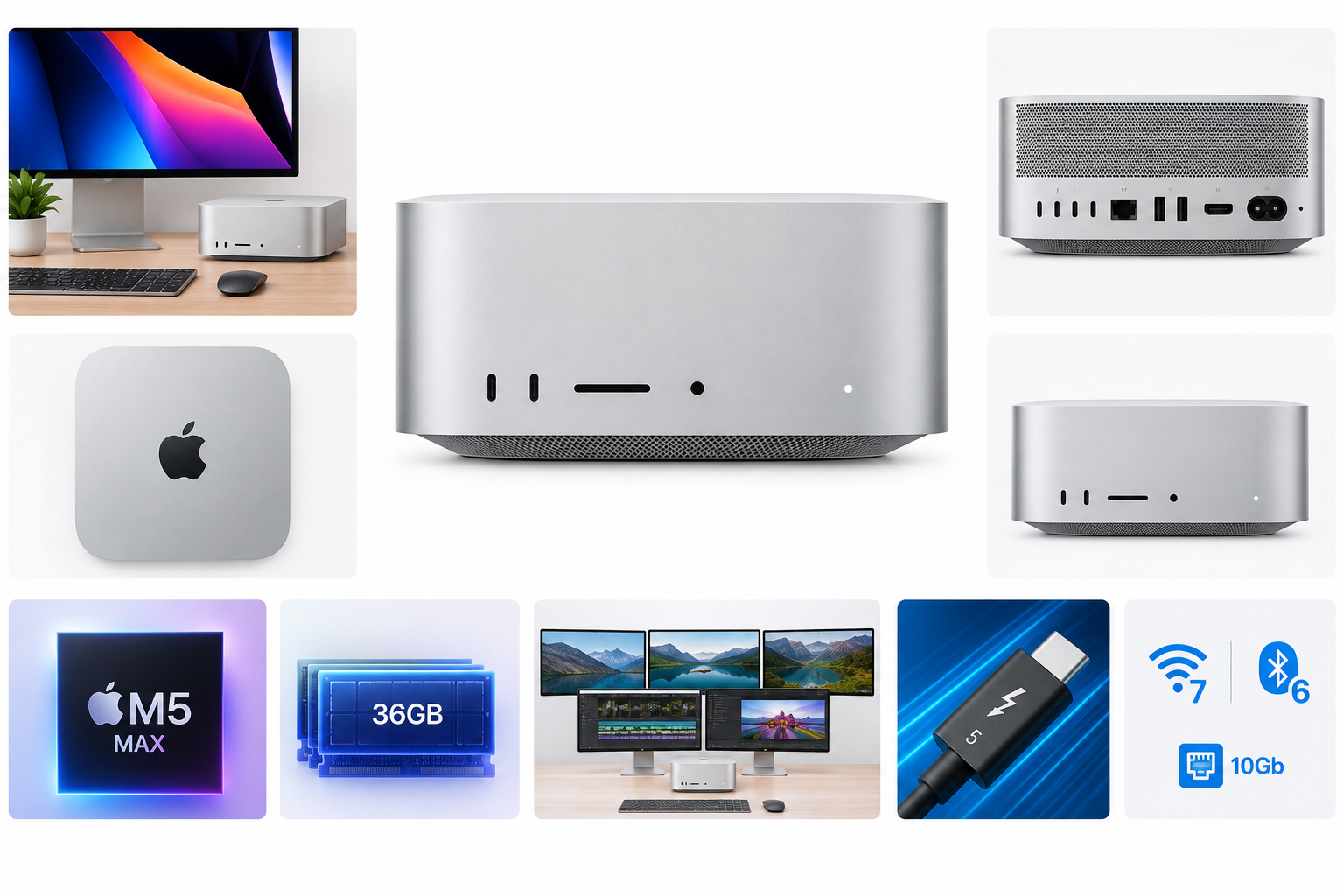
The Apple Mac Studio with M5 Max is a compact macOS desktop computer built for users who need substantially more performance and connectivity than a typical laptop or entry-level desktop can provide. This configuration features Apple’s M5 Max chip with an 18-core CPU, 32-core GPU, 16-core Neural Engine, hardware-accelerated ray tracing, and 36GB of unified memory.
The system includes a 512GB SSD and a broad selection of expansion options, including four Thunderbolt 5 ports, two USB-A ports, HDMI 2.1, a front-facing SDXC card slot, a headphone jack, and 10Gb Ethernet. It is sold as a compact computer rather than a complete workstation setup, so users must provide their own display and input devices.
Why It Matters
The Mac Studio is designed to deliver workstation-class capability in a relatively small enclosure. Its Apple silicon architecture combines CPU, GPU, and memory resources in a unified system, which can benefit applications that work with high-resolution media, large datasets, code projects, and machine-learning workloads.
The M5 Max configuration is especially relevant for professionals who need fast local processing without moving every task to a cloud service. Its Neural Engine and neural accelerators can support compatible AI features, while the media engine is designed to accelerate workflows involving H.264, HEVC, ProRes, ProRes RAW, and AV1 content.
Connectivity is another major consideration. Thunderbolt 5 provides high-bandwidth connections for external storage, docks, displays, and other peripherals. The system can also support up to five external displays, making it suitable for multi-monitor editing, development, trading, design, and production environments.
Key Advantages
- Strong processing capability: The 18-core CPU and 32-core GPU provide substantial headroom for compiling software, editing video, creating 3D content, running demanding productivity applications, and working with AI-enabled tools.
- Unified memory architecture: The 36GB memory configuration allows the CPU and GPU to share resources efficiently, which can be useful for graphics-heavy applications and large creative projects.
- Advanced media acceleration: Dedicated video decode and encode capabilities, along with ProRes acceleration, can improve performance in supported professional video applications.
- Extensive connectivity: Four Thunderbolt 5 ports, two USB-A ports, HDMI 2.1, front USB-C ports, an SDXC card slot, and a headphone jack provide flexibility for professional peripherals and accessories.
- 10Gb Ethernet: The built-in 10Gb Ethernet connection is well suited to fast network storage, media servers, studio networks, and other environments where wired throughput matters.
- Multi-display support: The ability to connect up to five external displays gives users considerable workspace for complex production and multitasking setups.
- Compact footprint: Measuring approximately 7.7 inches square and 3.7 inches high, the Mac Studio occupies considerably less desk space than many traditional workstation desktops.
- Modern wireless features: Wi-Fi 7 and Bluetooth 6 support provide current-generation wireless connectivity for compatible networks and accessories.
Key Limitations
- Limited internal storage for professional workloads: A 512GB SSD may fill quickly when storing high-resolution video, virtual machines, large software projects, game libraries, or local AI models. External Thunderbolt storage may be necessary.
- Memory and storage are not user-upgradable: Buyers should select a configuration carefully because Apple silicon Mac Studio systems are not designed for straightforward internal memory or storage upgrades after purchase.
- Separate peripherals are required: The computer does not include a display, keyboard, mouse, or other workstation accessories, which adds setup requirements for new users.
- macOS software compatibility: Most mainstream creative and productivity applications are available for macOS, but users who depend on Windows-only software, specialized enterprise tools, or certain game libraries may need compatibility solutions.
- Performance depends on software optimization: Applications that are not optimized for Apple silicon or that rely heavily on unsupported plug-ins may not benefit fully from the hardware.
- Large professional workloads may require additional accessories: A high-speed external SSD, Thunderbolt dock, card reader, or multi-display adapter may be useful depending on the intended workflow.
Who It’s For
The Mac Studio with M5 Max is a strong fit for video editors, motion-graphics artists, software developers, AI practitioners, photographers, 3D professionals, musicians, and other users who need a powerful stationary Mac. It is also well suited to home offices and studios where a compact computer must drive several displays and high-speed external devices.
Users working with ProRes footage, large codebases, virtual environments, high-resolution photography, 3D scenes, or local machine-learning tools will benefit most from the M5 Max platform. The system is also appealing to professionals who value a quiet, organized workspace and prefer a desktop computer that can remain connected to a permanent set of peripherals.
Who Should Skip It
This configuration may be excessive for users whose needs are limited to web browsing, email, office documents, video streaming, and light photo editing. A less powerful Mac may provide a better balance for those tasks.
It may also be a poor choice for buyers who need extensive internal upgrade options, depend on Windows-exclusive applications, require more than 512GB of internal storage without using external drives, or want an all-in-one computer with a built-in display.
Final Recommendation
The Apple Mac Studio with M5 Max is a capable professional desktop that prioritizes processing performance, media acceleration, display support, and high-speed expansion in a compact enclosure. Its 18-core CPU, 32-core GPU, 36GB of unified memory, Thunderbolt 5 connectivity, and 10Gb Ethernet make it particularly suitable for demanding creative, development, and AI-oriented workflows.
Its main trade-offs are the fixed internal configuration, modest 512GB storage capacity for professional use, and the need to purchase a display and peripherals separately. For users already invested in macOS and seeking a compact workstation for sustained demanding workloads, this Mac Studio configuration is a compelling choice. For casual users or those who require broad hardware expandability and Windows compatibility, a different desktop platform may be more appropriate.