
Samsung 32-Inch ViewFinity S7 S70H 4K Monitor Review
Overview
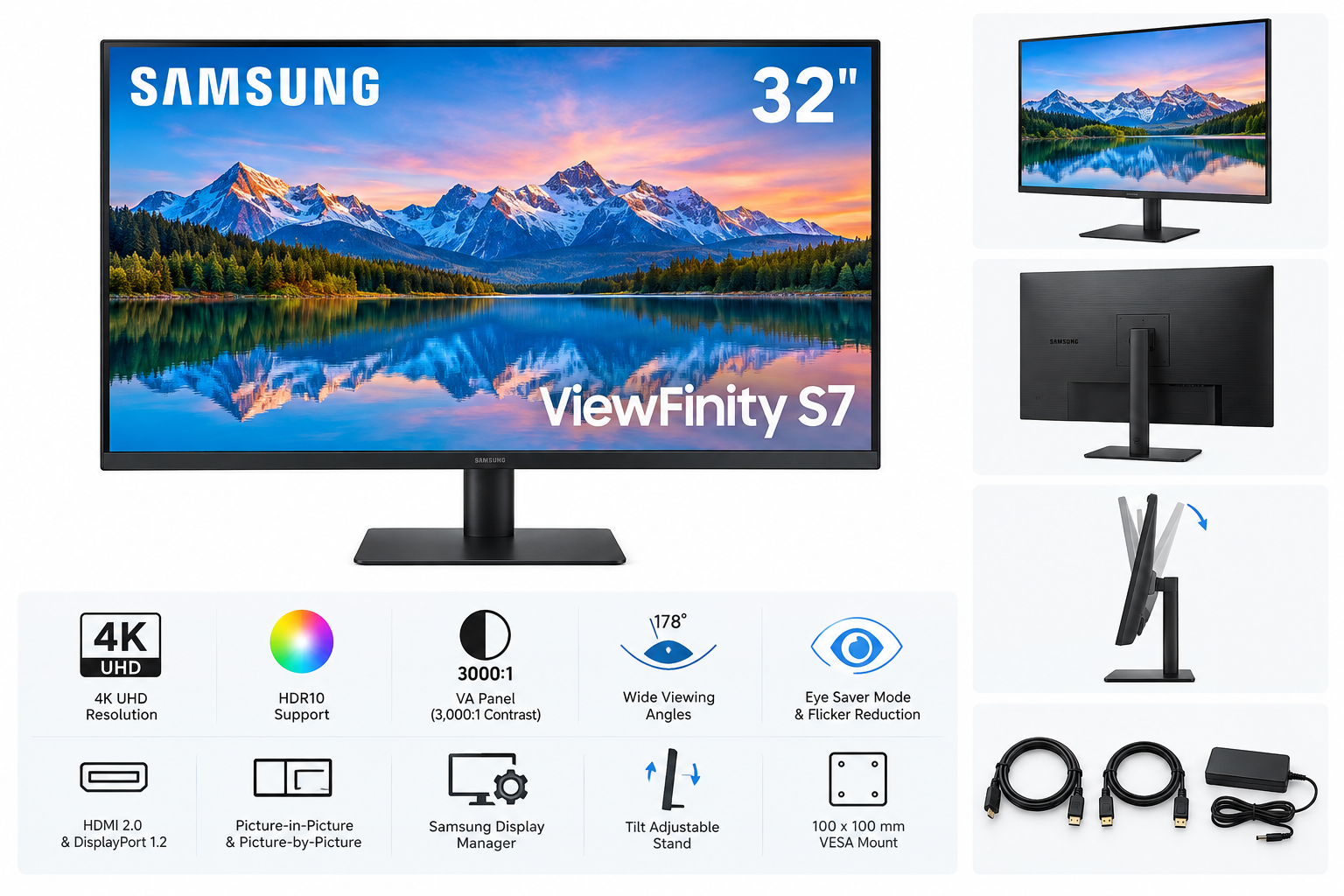
The Samsung 32-inch ViewFinity S7 S70H is a high-resolution desktop monitor designed for productivity, document work, creative applications, and everyday entertainment. Its 32-inch flat display provides substantial workspace, while the 4K UHD resolution delivers a sharp 3840 x 2160 image with a 16:9 aspect ratio.
The monitor uses a VA panel with a 3,000:1 static contrast ratio, 300 cd/m² typical brightness, 178-degree horizontal and vertical viewing angles, and support for up to 1.07 billion colors. HDR10 compatibility adds support for expanded contrast and color information in compatible content. With a maximum refresh rate of 60Hz, the S70H is primarily aimed at productivity and general-purpose use rather than competitive gaming.
Standout Features
4K UHD Resolution
The 3840 x 2160 resolution provides four times the pixel count of a Full HD display. On a 32-inch screen, this allows text, spreadsheets, images, and interface elements to appear detailed while providing room for multiple windows and large project files.
HDR10 Support
HDR10 compatibility can improve compatible video and visual content with a broader range of brightness and color. The feature is most useful when viewing HDR-enabled media, although the monitor's 300 cd/m² typical brightness means it is better suited to general HDR viewing than to high-end HDR mastering.
VA Panel and Wide Viewing Angles
The VA panel provides a higher stated contrast ratio than many conventional IPS office monitors, which can help produce deeper blacks in darker scenes. Its 178-degree viewing angles also make it practical for shared viewing and collaborative work.
Eye Saver Mode and Flicker Reduction
Samsung includes Eye Saver Mode to reduce blue-light output, along with flicker-reduction technology intended to make extended viewing more comfortable. These features are useful for long work sessions, especially in office environments or home workspaces.
Supporting Features
Connectivity
The S70H includes one HDMI 2.0 port, one DisplayPort 1.2 connection, and a headphone output. HDMI and DisplayPort cables are included, which simplifies setup with a desktop computer, laptop dock, or other compatible source device.
Samsung Display Manager
Samsung Display Manager provides software-based access to display controls and workflow tools. Depending on the connected system and configuration, it supports functions such as split-screen arrangements, brightness adjustment, color calibration, Picture-in-Picture, and Picture-by-Picture settings.
Multitasking Modes
Picture-in-Picture and Picture-by-Picture support can be helpful when working with two input sources. These modes allow users to view content from separate devices simultaneously, although the monitor's single HDMI and single DisplayPort input may limit how many sources can be connected without an external switch or dock.
Adjustable Stand and Mounting
The included stand supports tilt adjustment and limited horizontal angle adjustment. The monitor also supports a 100 x 100 mm wall or monitor-arm mounting pattern. Its simple stand design is functional, but it does not provide height, swivel, or pivot adjustment.
Usability
The 32-inch size is well suited to users who want more workspace without moving to an ultrawide display. At 4K resolution, the screen can accommodate detailed timelines, large spreadsheets, design applications, and side-by-side documents. Operating-system scaling may be useful for users who prefer larger interface text.
Setup is straightforward through HDMI or DisplayPort. The included cables reduce the need for additional accessories, while the external power adapter helps keep the monitor chassis relatively slim. The rear connections are conventional and easy to integrate into a standard desktop setup.
The main ergonomic limitation is the stand. Tilt adjustment is available, but users who need precise height positioning, portrait orientation, or extensive desk-side adjustment may prefer to pair the monitor with a VESA-compatible arm.
Performance
For office productivity, the S70H's 4K resolution is its central strength. Text and fine interface details can appear crisp, and the large canvas makes it easier to work with multiple applications at once. The VA panel's contrast specification is also advantageous for documents, dark user interfaces, and general media consumption.
The 60Hz refresh rate is sufficient for typical productivity, streaming, browsing, and casual gaming. It is not intended to compete with high-refresh gaming monitors, and the product does not emphasize gaming-oriented features such as a high refresh rate, adaptive-sync technology, or specialized response-time modes.
The monitor's 5ms gray-to-gray response-time specification is adequate for everyday desktop use. HDR10 can add visual range to compatible content, but users seeking professional HDR production should consider a display with substantially higher brightness, more advanced local dimming, and broader color-management capabilities.
The combination of Eye Saver Mode and flicker reduction supports extended use, while the wide viewing angles help maintain a consistent image when the user is not directly centered in front of the screen. As with other VA displays, image characteristics can vary depending on viewing position and content, so users requiring highly consistent color across a wide working area may want to evaluate an IPS or professional color-critical monitor instead.
Pros and Cons
Pros
- Sharp 4K UHD resolution at 3840 x 2160
- Spacious 32-inch screen for multitasking
- VA panel with a stated 3,000:1 static contrast ratio
- HDR10 support for compatible content
- 178-degree horizontal and vertical viewing angles
- Eye Saver Mode and flicker-reduction features
- HDMI 2.0 and DisplayPort 1.2 connectivity
- Picture-in-Picture and Picture-by-Picture support
- Samsung Display Manager software tools
- Includes HDMI and DisplayPort cables
- Supports 100 x 100 mm mounting
Cons
- Maximum refresh rate is limited to 60Hz
- Stand lacks height, swivel, and pivot adjustment
- Only one HDMI and one DisplayPort input are provided
- HDR performance is oriented toward general viewing rather than professional HDR work
- No integrated USB hub or USB-C video connection
- VA viewing characteristics may not suit users seeking the most consistent color uniformity from different angles
Summary
The Samsung 32-inch ViewFinity S7 S70H is a practical 4K monitor for users who prioritize sharp resolution, a large work area, and everyday comfort features. Its VA panel, HDR10 support, contrast specification, and wide viewing angles make it suitable for office work, browsing, media consumption, and general creative tasks.
Its 60Hz refresh rate, basic tilt-focused stand, and limited port selection make it less suitable for high-refresh gaming, advanced ergonomics, or professional HDR production. For productivity-focused users who want a large 4K display with Samsung's Display Manager tools and built-in eye-care features, the ViewFinity S7 S70H offers a balanced feature set in a straightforward design.