
WYZE Cam v4 Review: 2.5K Color Night Vision Security on a Budget
Introduction
The WYZE Cam v4 (Latest Model), 2.5K AI Security Camera, Indoor/Outdoor Cameras for Home Security, Baby Monitor & Pet Camera, Vibrant Color Night Vision, No Subscription Required is positioned as Wyze’s clearest wired camera to date, aimed at homeowners, renters, and small-office users who want sharper detail and smarter detection without locking into a mandatory subscription.
With 2.5K QHD resolution (2560 × 1440), Wi‑Fi 6, IP65 weather resistance, onboard (edge) AI person detection, and a built‑in spotlight and siren, the WYZE Cam v4 is designed to serve as a flexible option for front doors, backyards, nurseries, and pet areas alike. It also functions without a paid plan, while still supporting optional cloud AI upgrades through Wyze’s services.
This review focuses on what the camera is like to set up and live with day to day, its real‑world video and audio performance, and how it fits into a modern smart-home security setup.
Setup / Getting Started
Unboxing and First Impressions
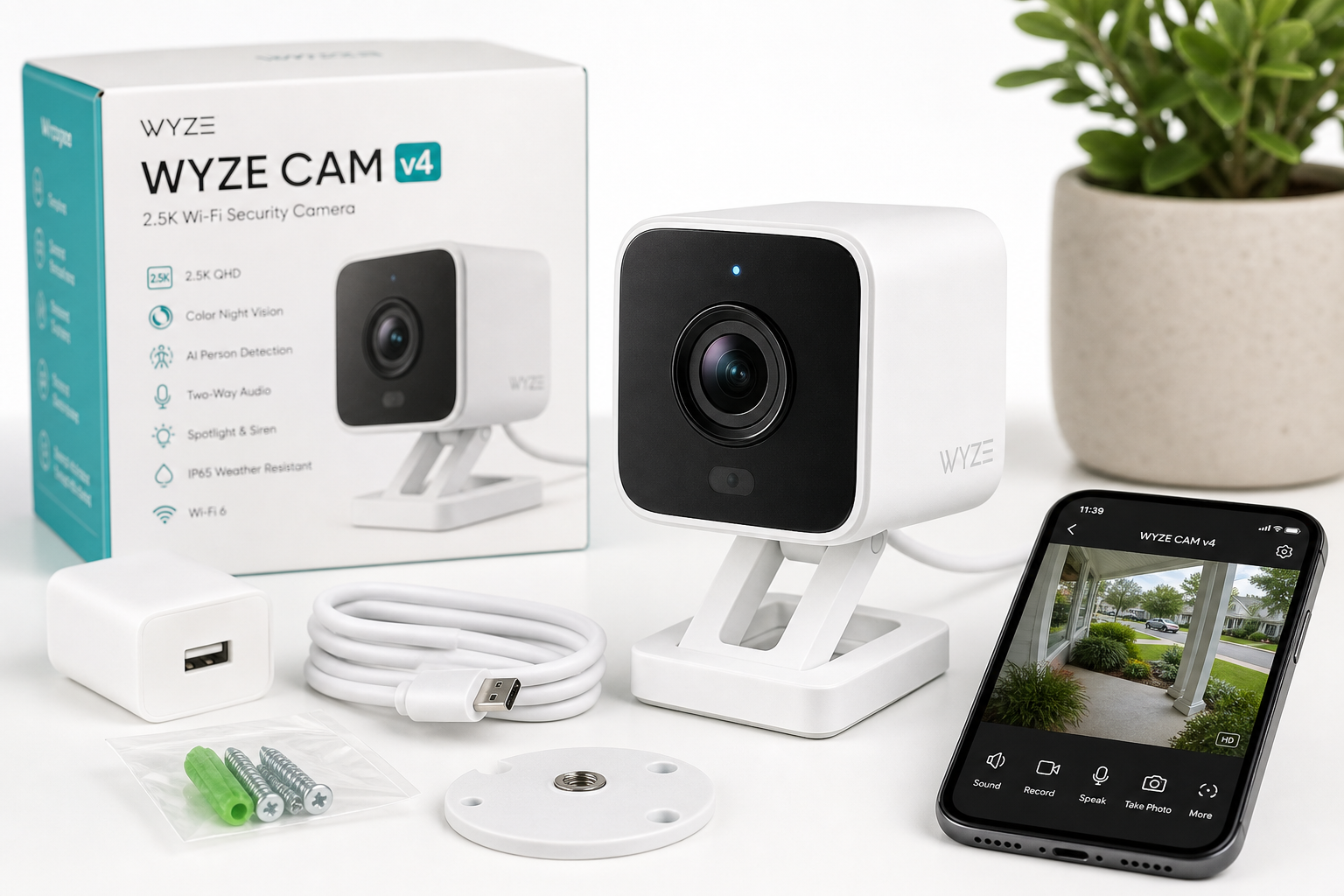
The WYZE Cam v4 continues Wyze’s compact cube‑style design with a refreshed, more refined look. The mount is familiar if you’ve used previous Wyze cams: a swiveling base that lets you angle the camera on a shelf, wall, or ceiling. The body is plastic with a textured matte finish, and the lens sits behind glass for better optical clarity.
In the box, you typically get:
- WYZE Cam v4 camera
- Mounting plate and screws/anchors
- USB power cable (micro‑USB)
- Power adapter
- Quick start documentation
The camera is rated IP65, so it’s suitable for both indoor and outdoor use when properly mounted and powered, making it flexible enough for front porches, garages, or indoor rooms.
Physical Installation
Indoor use:
- Place the camera on a flat surface (shelf, table, media console) or mount it on a wall.
- Use the included mount and screws if you want a more permanent installation.
Outdoor use:
- Choose a location that is sheltered from the most extreme direct rainfall and sun exposure, even though the housing is weather‑resistant.
- Ensure the power run is secure and not creating a tripping hazard; many users route the cable through a wall or along trim.
- If you’re in a climate with frequent storms or large temperature swings, consider weather‑rated accessories (like Wyze’s outdoor power adapter) for additional durability.
App Setup and Configuration
Setup is done through the Wyze app (Android and iOS):
- Plug in the camera and wait for it to power up.
- Open the Wyze app and tap to add a new device.
- Select Wyze Cam v4 from the list.
- Use your phone to scan the QR code displayed in the app when prompted.
- Connect the camera to your 2.4 GHz Wi‑Fi network (the v4 uses Wi‑Fi 6 on 2.4 GHz, improving range and congestion handling compared with earlier models).
Once connected, you can:
- Name the camera and assign it to a room.
- Enable or disable edge AI person detection (runs on the camera’s chip instead of the cloud).
- Configure detection zones, motion sensitivity, and notification rules.
- Decide whether to use a microSD card for continuous/local recording or rely on cloud event clips.
The initial setup is generally straightforward, especially if you’ve used other Wyze products.
Daily Usage
As a Home Security Camera
In typical daily use, the WYZE Cam v4 acts as an always‑on sentry for entry points and common areas:
- Live view: The 2.5K QHD stream shows more detail than older 1080p Wyze cams, making it easier to read small text, recognize faces closer to the camera, and capture useful license‑plate or package detail at short distances.
- Notifications: You can configure push alerts for motion, sound, and person detection. The edge AI person detection helps the camera distinguish people from general movement, reducing false alarms from foliage or shadows.
- Spotlight and siren: The integrated spotlight automatically triggers on motion (if enabled), improving color night vision and acting as a mild deterrent. The built‑in siren can be triggered manually from the app when you want extra attention on a situation.
For day‑to‑day home security, the combination of motion events, person detection, and local or cloud recording covers most basic monitoring scenarios.
As a Baby Monitor or Pet Camera
The compact size and two‑way audio make the WYZE Cam v4 a practical option for indoor monitoring:
-
Baby monitor:
- High‑resolution video helps you see small movements like chest rise or hand gestures.
- Color night vision with IR illumination provides a clearer, less grainy image in low light, though you may want to disable the spotlight and adjust IR brightness in nursery environments.
- Two‑way audio lets you talk to a child or partner in the room.
-
Pet camera:
- The wider field of view helps keep tabs on pets in living rooms, kitchens, or play areas.
- Smart detection can help differentiate human vs. general movement; optional cloud services can extend detection types further.
- The siren feature can be used cautiously as a deterrent if needed, but many pet owners rely on voice via two‑way audio instead.
Smart-Home Integration
The camera supports integrations with major smart‑home platforms, such as:
- Amazon Alexa
- Google Assistant
- IFTTT
This allows you to view the live stream on compatible smart displays, automate actions (e.g., trigger other devices when motion is detected), and weave the camera into broader home‑automation routines.
Performance & Reliability
Video Quality (Day and Night)
The hallmark of the WYZE Cam v4 is its 2.5K QHD resolution paired with a newer image sensor and improved image processing:
-
Daytime:
- Video is crisp, with more than enough detail to identify faces and objects in typical residential distances within the field of view.
- The Wide Dynamic Range (WDR) helps manage high‑contrast scenes, such as bright windows or sunlight across a shaded porch, retaining more detail in both highlights and shadows.
-
Nighttime:
- Color night vision uses low‑light optimization and the built‑in spotlight and IR LEDs to keep color in the frame longer before switching to traditional infrared.
- When the spotlight is active, colors remain surprisingly accurate compared to typical grayscale night footage, which can make it easier to identify clothing colors or vehicle details.
Overall, the jump to 2.5K and improvements to WDR and color night vision are among the strongest reasons to choose the v4 over earlier Wyze models.
Audio Quality
Audio plays a critical role in a security camera, and the WYZE Cam v4 improves on this in several ways:
- A more powerful amplifier and built‑in microphone yield louder, clearer two‑way audio.
- The siren reaches up to around 99 dB at the source, providing a noticeable deterrent in small to medium spaces.
For conversations through the camera, latency and clarity are acceptable for short commands and quick check‑ins, provided your internet connection is stable.
Connectivity and App Responsiveness
With Wi‑Fi 6 support on 2.4 GHz, the camera is designed to better handle:
- Congested networks (apartments, dense neighborhoods)
- Longer range compared to previous Wyze cams using older Wi‑Fi standards
In practice, this typically translates into:
- Faster connection times when starting a live view.
- Fewer dropped connections when placed near the range limits of your router, assuming a solid Wi‑Fi 6 or modern router.
Storage and Recording Options
The WYZE Cam v4 offers flexible recording options:
-
Local storage:
- Supports microSD cards (up to high capacities) for continuous 24/7 recording or event‑based local clips.
- Local recording is valuable if you want maximum control of your footage and reduced reliance on the cloud.
-
Cloud storage:
- Works with Wyze’s cloud services for event clips and extended cloud history.
- AI‑enhanced cloud plans add more sophisticated detections and longer retention but are optional.
A core selling point of this model is that basic operation does not require a subscription. You can rely entirely on live view, notifications, and local microSD storage if you prefer.
Reliability Over Time
Firmware updates are a regular part of Wyze’s ecosystem. Over time, updates have added features, refined AI detection, and addressed stability and security concerns. As with any smart camera, leaving automatic updates enabled and maintaining a strong Wi‑Fi signal are key to consistent, reliable operation.
What Works Well
-
Excellent Resolution for the Price Class
The step up to 2.5K QHD delivers a notably sharper image than 1080p cameras, providing better clarity for faces, text, and small details. -
Vibrant Color Night Vision with Spotlight
The combination of IR illumination, spotlight LEDs, and optimized low‑light processing makes nighttime footage more usable than traditional monochrome night video, especially in short to medium‑range scenarios. -
Edge AI Person Detection
Running basic person detection directly on the camera reduces dependency on the cloud and can speed up notifications while keeping subscription requirements optional. -
Flexible Indoor/Outdoor Design (IP65)
Being weather‑resistant while still compact enough for indoor use makes the v4 a good all‑around choice for users who might move it between locations over time. -
Wi‑Fi 6 and Improved Connectivity
Support for Wi‑Fi 6 at 2.4 GHz offers improved range and stability on modern routers and helps performance in crowded wireless environments. -
No Mandatory Subscription
The ability to use the camera fully with local storage and basic alerts is a standout advantage for users wary of recurring costs. -
Two‑Way Audio, Siren, and Smart Integrations
The combination of two‑way audio, an integrated siren, and support for Alexa, Google Assistant, and IFTTT makes it easier to integrate the camera into an existing smart‑home ecosystem.
What Could Be Improved
-
Power and Cabling Flexibility
The camera relies on wired power via a USB cable and adapter. While this ensures continuous operation, it means extra planning for outdoor installs and may require drilling or external cable management solutions. -
Field of View vs. Placement
The field of view is wide enough for most doorways and rooms, but it is not an ultra‑wide or pan‑tilt model. Users who need full room coverage with a single device may prefer a dedicated pan/tilt camera or multiple fixed v4 units. -
Cloud Plan Complexity
Wyze’s various cloud and AI plans can be confusing if you are new to the ecosystem. While the v4 functions fine without a subscription, understanding which plan adds which AI features and storage options may require some reading. -
Network Dependency for Remote Viewing
As with any cloud‑connected camera, live view and push notifications depend on both your home internet and Wyze’s service availability. Local recording to microSD mitigates data loss, but remote access is still network‑dependent. -
App Learning Curve for New Users
The Wyze app has grown feature‑rich over multiple product generations. New users may need time to discover all settings, especially around detection zones, notification schedules, and advanced AI options.
Overall Impression
The WYZE Cam v4 (Latest Model), 2.5K AI Security Camera, Indoor/Outdoor Cameras for Home Security, Baby Monitor & Pet Camera, Vibrant Color Night Vision, No Subscription Required stands out as a strong all‑round wired camera for home and small office users who value higher resolution, better night vision, and flexibility.
Its 2.5K QHD video, color night vision with built‑in spotlight, edge AI person detection, and IP65 weather resistance combine to deliver a level of performance that comfortably exceeds many entry‑level 1080p models. The addition of Wi‑Fi 6 support and improved audio further modernize the platform.
For users already in the Wyze ecosystem, the v4 is a natural upgrade for critical locations like front doors, main entries, nurseries, or high‑traffic living areas. For new buyers, it offers a compelling entry into smart security with the ability to operate effectively without a mandatory subscription, while still leaving room to grow into advanced AI and cloud services if needed.
Overall, the WYZE Cam v4 is a well‑rounded, future‑minded choice for those seeking a versatile, higher‑resolution wired camera that balances features, flexibility, and long‑term usability.