
Carbon Fiber Wireless Android Auto & CarPlay Adapter Review: A Compact Upgrade for 2016+ OEM Systems
Introduction
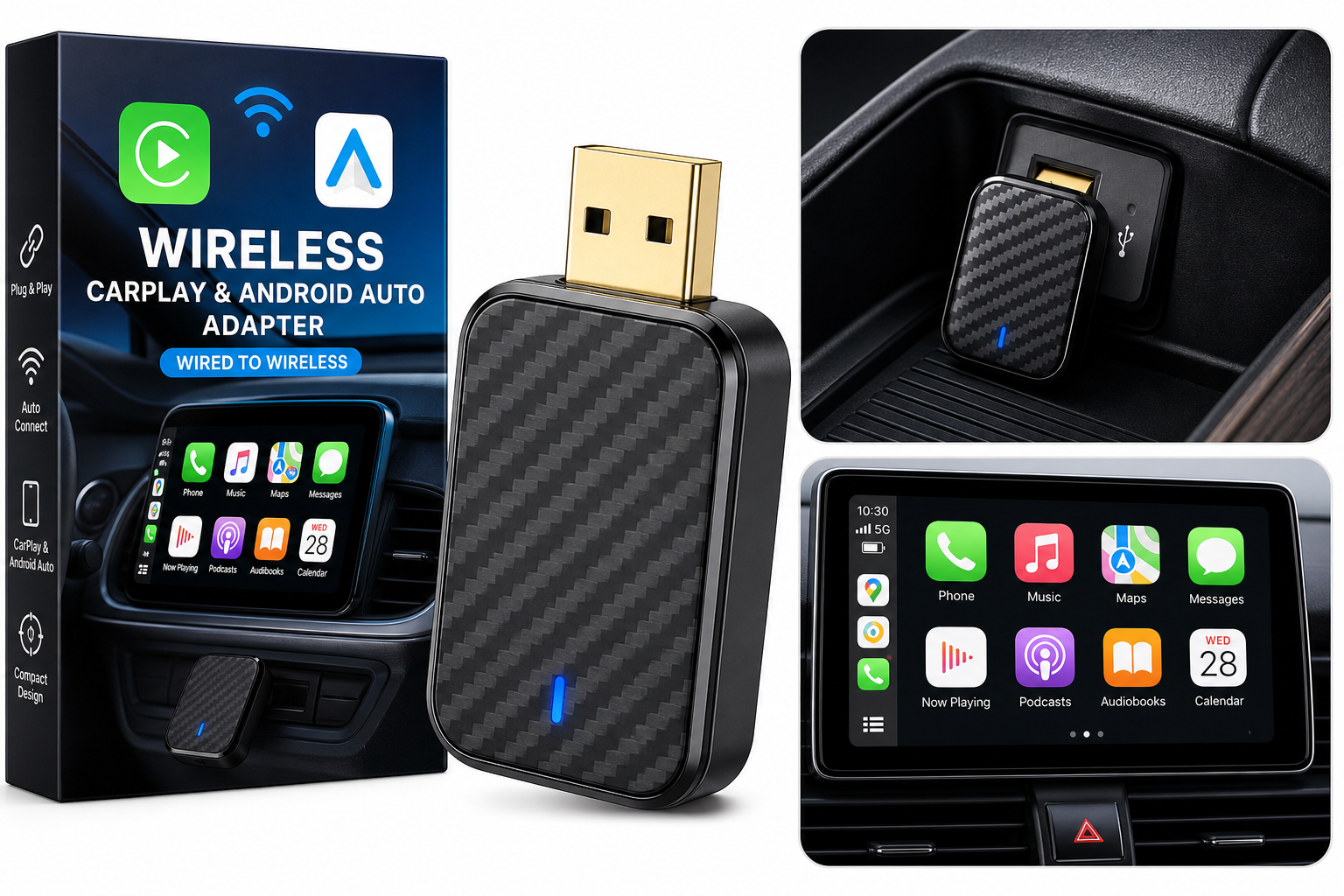
The Carbon Fiber Wireless Android Auto & CarPlay Adapter, Wired to Wireless is designed for drivers who already have factory-wired Apple CarPlay or Android Auto but want the convenience of a fully wireless setup. Instead of plugging your phone into the USB port every time you start the car, this dongle stays connected to the vehicle while your phone connects over Bluetooth and Wi‑Fi.
Featuring a mini enclosure with a carbon-fiber-style finish and a gold-plated USB connector, the adapter aims to blend into modern interiors while offering a more robust physical connection. It is promoted as plug-and-play, with automatic reconnection each time you start the engine, and is intended for OEM wired CarPlay/Android Auto vehicles from model year 2016 onward.
This review focuses on real-world usage patterns—commuting, road trips, rideshare and family use—to help you decide whether this compact adapter is a worthwhile upgrade for your infotainment system.
Typical Use Cases
1. Daily Commuting
For most buyers, the primary use is everyday commuting. In this scenario, the adapter stays permanently in the USB port while you:
- Start the car and wait for the phone to connect automatically.
- Use navigation apps like Google Maps, Waze, or Apple Maps.
- Stream music, podcasts, or audiobooks.
- Handle hands-free calls and messages via voice assistants.
The goal is to save the time and hassle of plugging in a cable multiple times per day.
2. Navigation-Heavy Road Trips
On longer drives, you’re likely to rely heavily on:
- Turn-by-turn navigation with real-time traffic.
- Continuous media streaming for several hours.
- Frequent voice assistant interactions.
In this scenario, connection stability and latency (audio delay, map responsiveness) matter more than raw connection time.
3. Shared/Family Vehicles
In households where multiple people regularly drive the same car, switching phones between drivers can become tedious with a wired connection. This adapter is aimed at situations where:
- One person drives in the morning, another in the evening.
- Different family members connect their own phones to CarPlay/Android Auto.
- You want the car to automatically reconnect to the last used phone, or to a preferred device after pairing.
4. Rideshare and Professional Drivers
For rideshare, delivery, and field-service drivers, getting into the car and starting navigation quickly is critical. They may:
- Get in and out of the vehicle dozens of times daily.
- Need seamless reconnection after short stops.
- Prefer a clean, cable-free cockpit for ergonomics and professionalism.
5. Compact or Premium Interiors
The small, mini form factor and carbon-fiber-style design make this adapter suitable for:
- Vehicles with limited console space or shallow storage compartments.
- Premium interiors where a bulky plastic dongle would look out of place.
- Installations where you may want to tuck the adapter into a cubby or behind a small door while leaving it permanently plugged in.
Performance in Each Scenario
Daily Commuting Performance
Connection Time & Auto Reconnect
For daily commuting, the adapter’s automatic reconnection is the main selling point. Once paired, it typically connects your phone within a short period after ignition. You’ll generally see CarPlay or Android Auto appear on the screen while you’re still adjusting mirrors or seat position.
Navigation & Voice Control
Maps and navigation functions work as expected. Voice commands for destinations, contact calls, and media control usually respond promptly, with only minor, often unnoticeable delay compared to a wired connection.
Media Playback
Streaming audio (music, podcasts) runs smoothly once the connection is established. Occasional brief stutters can occur in environments with heavy wireless interference, but in most commuter conditions, playback remains stable.
Navigation-Heavy Road Trips
On long drives, the adapter’s reliability becomes more important than the initial connection speed.
- Stability: Once connected, the wireless link tends to remain solid over extended periods, provided your phone remains within typical cabin range (pocket, cupholder, phone mount).
- Latency: Wireless CarPlay and Android Auto can introduce a small amount of latency compared to wired. In practice, this is usually more noticeable in rapid track-skipping or very fast UI interactions than in navigation usage.
- Heat & Endurance: The carbon-fiber-style plastic shell helps the adapter stay relatively cool, which is important during multi-hour sessions in warm cabins. Most users will not notice thermal throttling or slowdowns during extended use.
Shared/Family Vehicle Usage
In multi-driver scenarios:
- Pairing: Initial pairing with each phone requires a one-time setup through Bluetooth, followed by Wi‑Fi handoff. After that, the adapter remembers paired devices.
- Priority: Most such adapters prioritize the last successfully connected phone. That means if two paired users are in the car, the one whose phone connected on the previous trip is most likely to reconnect automatically.
- Swapping Drivers: Switching to another driver usually involves disconnecting the first phone’s Bluetooth or manually selecting the adapter from the second phone’s Bluetooth list. It’s not as seamless as having completely separate profiles per driver, but it’s still quicker than re-plugging cables repeatedly.
Rideshare and Professional Drivers
For rideshare and professional use, performance considerations include:
- Connection Reliability: Frequent starts and stops throughout the day emphasize the importance of consistent auto-reconnect behavior. The adapter’s plug-and-play design means that once set up, you rarely need to touch it again.
- Cabin Tidiness: Without a dangling cable to plug and unplug, the driver’s area remains cleaner and easier to move around, which can matter during busy shifts.
- Battery & Charging Strategy: Since the adapter removes the “forced charging” associated with wired CarPlay/Android Auto, drivers may want a separate wireless charger or occasional wired charge to keep phone battery levels up during long shifts.
Compact or Premium Interiors
Here, physical design matters more:
- Mini Footprint: The mini size helps it fit flush in tight console spaces and behind flip-down covers.
- Aesthetics: The carbon-fiber-style pattern is subtle and pairs reasonably well with modern trim, particularly in performance or luxury-oriented cabins.
- Gold-Plated USB Connector: While mostly a durability and corrosion-resistance benefit, it also contributes to a more premium feel when handling or replugging the adapter.
Strengths Across Scenarios
1. True Plug & Play Setup
For cars that already have wired OEM CarPlay or Android Auto, setup is intentionally simple:
- Plug the adapter into the existing USB port that you normally use for CarPlay/Android Auto.
- Wait for the on-screen prompt or the adapter’s Wi‑Fi/Bluetooth broadcast.
- Pair your phone once, following the on-screen instructions.
After that, the system behaves much like built-in wireless CarPlay/Android Auto: you get in, start the car, and the phone connects automatically.
2. Auto Reconnect Convenience
Automatic reconnection is a key advantage. You no longer need to:
- Unstuff a cable from the center console.
- Plug and unplug the phone every trip.
- Worry about which passenger USB port supports CarPlay.
This is particularly useful for short trips and errands where the hassle of repeated plugging can be disproportionate to the time spent driving.
3. Compact, Discreet Design
The mini carbon-fiber-style enclosure and short housing work well in:
- Vehicles with a single USB port hidden in small compartments.
- Dashboards where you don’t want a bulky adapter or trailing cable.
- Installations where you plan to "set it and forget it."
Once plugged in and tucked away, the adapter becomes nearly invisible in everyday use.
4. Gold-Plated USB Connector
The gold-plated USB plug is designed for:
- Better corrosion resistance in humid or temperature-variable environments.
- A sturdier physical connection from repeated insertion/removal.
While it won’t change data throughput dramatically vs. standard connectors, it supports the product’s long-term reliability story.
5. Dual-Platform Support (CarPlay & Android Auto)
Supporting both Apple CarPlay and Android Auto in a single dongle simplifies life for multi-device households:
- iPhone users get wireless CarPlay.
- Android users (with compatible devices and OS versions) get wireless Android Auto.
- Households that mix platforms can share a single adapter instead of installing separate devices.
Limitations Across Scenarios
1. Compatibility Requirements
This adapter is not a universal Bluetooth-to-screen solution. It requires:
- A vehicle or head unit with factory-wired Apple CarPlay and/or Android Auto support.
- Typically a model year of 2016 or newer, as indicated by the product description.
It will not add CarPlay or Android Auto to cars that never had it, nor will it work well with every aftermarket stereo. Always verify compatibility against the product listing and, if available, the manual.
2. Potential Wireless Latency
Wireless CarPlay/Android Auto nearly always introduces a small amount of extra latency compared to a cable. That can manifest as:
- Slight delays between pressing "Next" and the audio track changing.
- Very minor lag in UI responsiveness when rapidly opening apps or scrolling lists.
For navigation and normal media use, this is rarely problematic, but drivers who are very sensitive to latency—or who frequently use audio/video sync-critical apps—should temper expectations.
3. Dependence on Phone Battery & Signal
Because the phone connects via Wi‑Fi and Bluetooth while not necessarily charging, long sessions rely more heavily on your phone’s battery. You may need to:
- Use a separate USB or wireless charger during long drives.
- Keep an eye on power-hungry apps such as constant GPS navigation and streaming services.
Additionally, streaming quality remains dependent on your cellular data coverage, which is true regardless of whether your setup is wired or wireless.
4. Multi-Driver Complexity
Although the adapter remembers multiple devices, driver switching is not entirely automatic:
- The last-connected phone is usually prioritized.
- If two paired phones are present, you may need to manually disconnect one or select the adapter from the other’s Bluetooth list to switch control.
This is normal behavior for most wireless CarPlay/Android Auto adapters, but it’s worth understanding if your household frequently swaps drivers mid-day.
5. Occasional Firmware Nuances
Wireless infotainment adapters often rely on firmware for compatibility and stability with different vehicle brands and software versions. While this product emphasizes easy use, you may encounter situations where:
- Certain head units respond differently after a system update.
- A rare bug requires resetting the adapter or phone’s network settings.
Checking the product page or included documentation for firmware update procedures (if supported) is advisable, especially if you notice new issues after your vehicle’s software is updated.
Verdict
The Carbon Fiber Wireless Android Auto & CarPlay Adapter, Wired to Wireless is a focused upgrade for drivers who already have wired CarPlay or Android Auto and simply want to eliminate the daily cable routine.
It stands out with:
- A compact, carbon-fiber-style mini design that disappears into tight console spaces.
- Straightforward plug-and-play setup on compatible 2016+ OEM systems.
- Automatic reconnection that makes daily commuting and short errand runs more convenient.
- Dual support for both Apple CarPlay and Android Auto, suitable for mixed-platform households.
You should consider this adapter if:
- Your vehicle has wired CarPlay or Android Auto and you want a wireless experience without replacing the head unit.
- You value a discreet, small-footprint dongle that won’t clutter a premium interior.
- Multiple drivers in your household use both iPhone and Android phones.
You may want to look elsewhere or stay wired if:
- Your vehicle does not support wired CarPlay or Android Auto at all.
- You are extremely sensitive to any UI or audio latency and prioritize absolute minimal delay above cable-free convenience.
For most compatible vehicles, this adapter delivers exactly what it promises: a simple, plug-and-play path from wired to wireless Android Auto and CarPlay, with a design that feels at home in modern interiors and a feature set tuned for everyday driving scenarios.