
LOVPOI 9-Inch Truck GPS 2026 Review: Big-Screen Navigation for Commercial Drivers
Introduction
The LOVPOI Truck GPS Commercial Drivers 2026, 9 inch Trucker GPS for Semi Truck | GPS Navigator for Car with 2026 Maps Lifetime Free Updates, Voice Guidance for Speed Warnings, Custom Routing, Driver Alerts is a standalone navigation device aimed squarely at professional truckers and commercial drivers.
With a bright 9‑inch touchscreen, truck‑specific routing, and lifetime map updates that include 2026 coverage for North America, it is designed to sit at the center of your dash as a dedicated navigation tool rather than relying on a smartphone app. The unit also supports multiple vehicle modes (truck, car, bus, ambulance, taxi and more), lane guidance, and driver alerts for hazards like dangerous curves, speed changes, speed cameras, and low bridges.
This review looks at how the LOVPOI 9‑inch truck GPS fits into a working driver’s day: how easy it is to set up, how it behaves on the road, and what kinds of fleets and drivers are most likely to benefit from it.
Setup / Getting Started
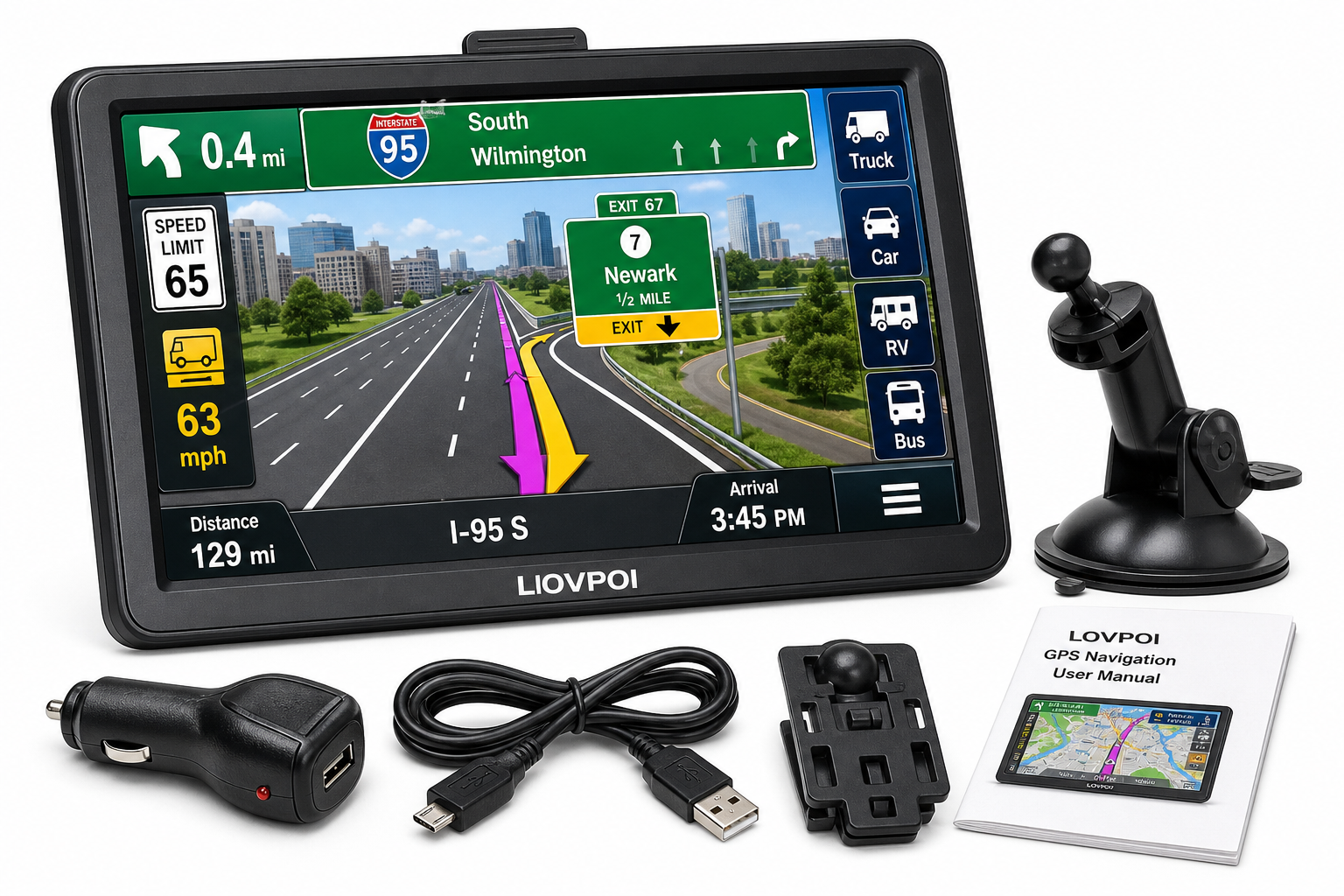
What’s in the box
Typical retail packages for this model include:
- LOVPOI 9‑inch GPS navigation unit
- Suction cup mount and back bracket for windshield/dashboard mounting
- Car charger (12/24 V compatible for truck power outlets)
- USB cable for connecting to a Windows PC
- User manual
The hardware layout is straightforward: power button, microSD/TF card slot for map storage and expansion, power input, and the 9‑inch 800×480 touchscreen.
Mounting in the cab
The device is physically large, which is an advantage for readability but means positioning matters. The suction mount and bracket give enough adjustability to place the screen near eye level without blocking too much of the windshield.
For most semi‑truck cabs, the unit works best:
- Mounted slightly to the right of the steering wheel, low enough not to obstruct the road view
- With power cable routed along the dash trim or A‑pillar to avoid dangling wires
A dedicated, stable mount is especially important on rough roads; otherwise vibration can make taps less precise.
Initial configuration
On first power‑up, the LOVPOI GPS walks you through:
- Language and voice selection – supports dozens of voice options with spoken turn‑by‑turn guidance.
- Time and units – set local time, 12/24‑hour format, and distance units.
- Vehicle profile – for truck use, you enter:
- Vehicle height, length, width
- Gross weight and axle weight
- Hazmat or other restrictions, if applicable
This profile is critical; the device uses it to calculate custom truck routes that avoid low bridges, restricted roads, and weight‑limited segments.
Map updates
The unit comes preloaded with recent North America maps (USA, Canada, Mexico) and supports lifetime free updates. Updates are handled by connecting the GPS to a Windows PC via USB or by loading maps from an external TF card. Support for additional regions (such as Europe or Australia) is also available via map downloads.
This PC‑based update process is less convenient than over‑the‑air updates, but for many drivers who plan routes from home or a terminal, periodically plugging the device into a laptop is manageable.
Daily Usage
Interface and screen
The standout feature is the 9‑inch display:
- Large, easy‑to‑read map view suitable for quick glances while driving
- 2D and 3D navigation modes
- Clear lane guidance at complex interchanges
Buttons, menus, and fonts are sized for fingertip control, even when the truck is moving (though any configuration should still be done while parked for safety).
Entering destinations and routes
You can plan trips by:
- Entering an address
- Searching points of interest (fuel stops, rest areas, truck service, etc.)
- Adding waypoints and multiple stops
Once a truck profile is active, routing automatically takes height and weight into account. The system provides:
- Turn‑by‑turn voice guidance
- On‑screen arrows and lane guidance
- Distance to next maneuver and estimated arrival times
Voice guidance and audio
The voice prompts are clear and timely, with:
- Advance notice before turns and exits
- Speed warnings when exceeding the posted limit
- Alerts for upcoming hazards (school zones, sharp curves, speed cameras, red lights, and similar).
An FM transmission function can broadcast navigation audio through the vehicle’s stereo system, effectively amplifying the directions without using the radio itself. This helps in noisy cabs where the unit’s built‑in speaker might struggle to cut through engine noise.
Multiple vehicle modes
Although the device is marketed for semi trucks, it supports several modes:
- Truck (including commercial and semi‑truck profiles)
- Car
- RV/Bus
- Ambulance and taxi profiles in some firmware versions
This makes the unit flexible for drivers who switch between commercial trucks, personal vehicles, or light‑duty fleet vehicles.
Performance & Reliability
GPS accuracy and routing
In typical conditions, the LOVPOI unit locks onto satellites quickly and maintains a solid fix. Positioning on major highways and interstates is generally accurate, with lane‑level guidance at large junctions.
Truck‑specific routing aims to:
- Avoid low bridges and overpasses under your truck’s height
- Steer clear of weight‑restricted roads where your configured weight exceeds posted limits
- Prefer main truck routes and highways over small residential streets where possible
However, any truck GPS—especially standalone units without real‑time map corrections—can occasionally suggest:
- Secondary roads that are technically legal but not ideal for a large rig
- Routes that don’t fully reflect the very latest local restrictions or construction changes
For this reason, commercial drivers should still cross‑check with road signs, paper atlases, or dispatch instructions, especially on unfamiliar routes.
Speed warnings and alerts
The system’s speed‑limit database and alerts are helpful for staying compliant. As with any preloaded map data, there may be areas where:
- Newly changed speed limits aren’t yet reflected
- Local school zones or special restrictions differ from what the device announces
Used as a supplemental cue—rather than the sole authority—the speed alerts reduce the need to constantly scan for roadside signs, especially at night or in bad weather.
Stability and responsiveness
The hardware is basic but adequate for a dedicated GPS:
- Menu transitions and map zooming are generally smooth
- Route recalculation after missed turns happens in a reasonable time
Some users report occasional freezes or screen switching if the unit is underpowered or the mount transmits a lot of vibration. Ensuring it’s fully charged on first use, consistently powered via the truck outlet, and solidly mounted tends to improve reliability.
Battery life is limited (around a couple of hours), so the device is best used plugged in continuously during trips.
What Works Well
1. Large, dedicated display
The 9‑inch screen is a major advantage over running navigation on a phone:
- Easy to read from typical driver seating positions
- Clear, uncluttered presentation of truck routes and upcoming maneuvers
- 2D/3D options help with depth perception and understanding complex interchanges
For long‑haul drivers spending many hours on the road, reduced eye strain and fewer squints at a small phone screen are meaningful quality‑of‑life improvements.
2. Truck‑specific routing
By using your truck’s actual dimensions and weight, the LOVPOI GPS goes beyond generic car navigation. It is designed to:
- Minimize encounters with low bridges and restricted roads
- Offer routes that are more realistic for a tractor‑trailer or heavy commercial vehicle
While no solution is perfect, this is considerably better than a standard car GPS for commercial driving.
3. Lifetime map updates
Lifetime updates on 2026‑level maps reduce the total cost of ownership and extend the usefulness of the device. As long as you periodically connect it to a compatible PC, the navigation data can remain reasonably current for years.
4. Voice guidance and alerts
The combination of turn‑by‑turn guidance, speed warnings, and driver alerts (dangerous curves, speed cameras, traffic lights, and other hazards) supports safer driving, especially when paired with the FM audio output for louder instructions.
5. Multi‑vehicle flexibility
The ability to switch between truck and car or other vehicle modes makes the unit attractive to:
- Owner‑operators who also drive a personal vehicle
- Small fleets that share equipment across different vehicle classes
What Could Be Improved
1. Map update process
Requiring a Windows PC or TF card for map updates is workable but dated. Over‑the‑air or Wi‑Fi updates directly on the device would:
- Simplify keeping maps fresh
- Reduce the risk of running with outdated truck restrictions or speed data
Mac users in particular may find the current process inconvenient.
2. Real‑time traffic and data services
The unit focuses on offline navigation. That’s reliable in low‑signal areas, but it means:
- No built‑in real‑time traffic rerouting
- No live weather overlays or crowd‑sourced incident alerts
Drivers used to smartphone apps with constantly updated traffic awareness may miss these features. Combining this GPS with a phone‑based traffic app is one way to compensate.
3. Interface polish and learning curve
Compared with premium brands, the interface can feel more utilitarian:
- Menu structure is not always as intuitive as high‑end competitors
- Some functions, like advanced route planning or managing saved favorites, can take a few extra taps
Experienced drivers will adapt quickly, but new users should expect to spend time learning the layout before relying on it in dense urban areas.
4. Occasional routing quirks
Standalone truck GPS units sometimes:
- Suggest legal but sub‑optimal roads through tight neighborhoods
- Miss the most practical truck entrance to a facility
The LOVPOI device is no exception. Professional drivers still need to cross‑check with:
- Posted signs and local rules
- Company directions and terminal notes
- Their own judgment and experience
Overall Impression
The LOVPOI Truck GPS Commercial Drivers 2026, 9 inch Trucker GPS for Semi Truck | GPS Navigator for Car with 2026 Maps Lifetime Free Updates, Voice Guidance for Speed Warnings, Custom Routing, Driver Alerts is a practical, big‑screen navigation tool for commercial drivers who want a dedicated GPS separate from their phone.
Its strengths are clear:
- A large, easy‑to‑read 9‑inch display
- Truck‑specific routing based on vehicle dimensions and weight
- Lifetime map updates with 2026 coverage
- Helpful voice alerts for speed, hazards, and upcoming maneuvers
- Support for multiple vehicle types in one device
In return, you accept some trade‑offs versus premium or app‑based solutions, including a more manual map update process, limited real‑time data, and occasional routing quirks that still require driver oversight.
For long‑haul truckers, regional drivers, and small fleets that want an affordable, dedicated truck GPS with a large screen and lifetime updates, this LOVPOI model is a solid option—provided you treat it as a professional tool to supplement, not replace, your own route planning and awareness.
If you’re considering this device, it’s worth reviewing your typical routes, how often you can connect to a PC for updates, and whether you’ll pair it with a smartphone traffic app. For many commercial drivers, that combination delivers a workable balance of offline reliability and up‑to‑date road intelligence.